

Affordable Home Design Software for Beginners: A Comprehensive Guide
Share this:
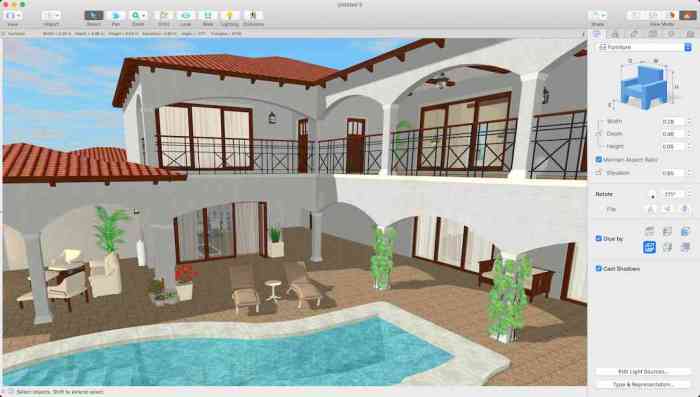
Embark on a journey into the world of affordable home design software for beginners, where creativity meets practicality to bring your design dreams to life. This guide will explore the key features, popular options, and cost-effective solutions that make these tools essential for novice designers.
From understanding what makes software suitable for beginners to discovering how to create budget-friendly designs, this guide covers all you need to know to kickstart your design projects.
Overview of Affordable Home Design Software
Affordable home design software refers to user-friendly computer programs that allow beginners to create and visualize their home design ideas without breaking the bank. These software options are budget-friendly, making them accessible to individuals who are new to the world of home design.
Key Features for Beginners
- Intuitive Interface: Affordable home design software typically offers a user-friendly interface that is easy to navigate, even for those with little to no design experience.
- Pre-designed Templates: These software options often come with pre-designed templates that beginners can customize to suit their preferences, eliminating the need to start from scratch.
- Basic Tools: The software includes essential tools for designing floor plans, adding furniture, and experimenting with colors and textures, making it simple for beginners to bring their ideas to life.
Importance of Affordability
Affordability is crucial for beginners in home design software as it allows them to explore their creativity and learn the basics of design without investing a significant amount of money. By choosing affordable software, beginners can gain valuable experience and confidence in their design skills without feeling overwhelmed by the cost.
Popular Affordable Home Design Software Options
When it comes to affordable home design software options for beginners, there are several popular choices available in the market. These software tools offer a range of features, ease of use, and pricing options to cater to different needs and preferences.
1. Sweet Home 3D
Sweet Home 3D is a popular choice for beginners looking to design their home interiors. It offers a simple drag-and-drop interface, making it easy to create floor plans and 3D models. The software also provides a catalog of furniture and decor items to enhance your designs.
Sweet Home 3D is free to download and use.
2. Home Designer Suite
Home Designer Suite is a more advanced option that offers a comprehensive set of tools for designing both interiors and exteriors. It includes features such as automated building tools, 3D visualization, and virtual tours. While it comes at a higher price point compared to other options, it provides extensive capabilities for creating detailed home designs.
3. RoomSketcher
RoomSketcher is a user-friendly software that allows beginners to create floor plans, furnish rooms, and visualize designs in 3D. It offers a wide range of customization options and a large library of furniture and decor items. RoomSketcher offers both free and paid subscription plans, depending on the level of features and functionality needed.
4. SketchUp Free
SketchUp Free is a versatile software tool that can be used for both home design and architectural projects. It offers intuitive drawing and modeling features, allowing users to create detailed 3D designs. While the free version has limited capabilities, the paid version, SketchUp Pro, provides additional tools and functionality for more complex projects.
5. HomeByMe
HomeByMe is an online home design software that offers a range of features for creating 2D and 3D designs. It includes a catalog of furniture and decor items, as well as the ability to visualize designs in virtual reality. HomeByMe offers both free and paid subscription options, depending on the level of customization and rendering quality desired.
User-Friendly Interface and Tools
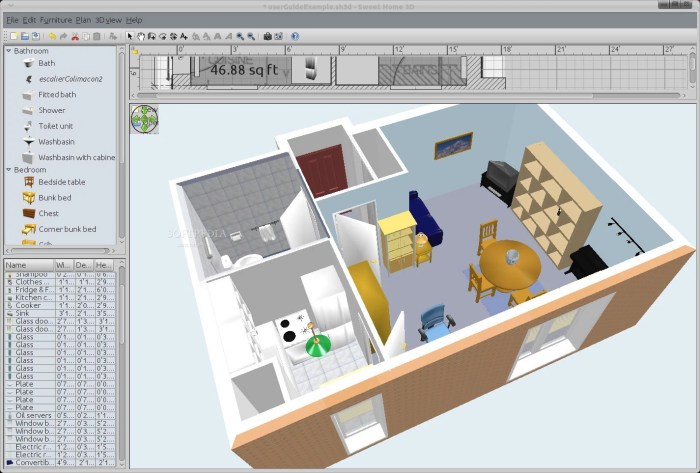
When it comes to affordable home design software for beginners, having a user-friendly interface is crucial. A simple and intuitive interface can make the learning curve much smoother for those new to home design software, allowing them to focus more on their creativity rather than struggling with complex tools
Essential Tools for Beginners
- Floor Plan Creator: Look for software that offers easy-to-use tools for creating floor plans. This feature is essential for designing the layout of your space.
- 3D Visualization: Choose software that allows you to visualize your designs in 3D. This feature helps beginners see how their ideas will look in real life.
- Library of Objects: A diverse library of objects like furniture, fixtures, and decor items can help beginners easily furnish and decorate their designs without the need for advanced modeling skills.
- Drag-and-Drop Functionality: Look for software that allows you to drag and drop elements to easily place and arrange them in your design.
Tips for Navigating and Utilizing Tools
- Take Advantage of Tutorials: Many affordable home design software options offer tutorials to help beginners learn how to use the tools effectively. Make sure to watch these tutorials to get the most out of the software.
- Start Simple: Begin by experimenting with basic tools and features before diving into more advanced functionalities. This approach can help you build confidence and gradually improve your skills.
- Practice Regularly: The more you practice using the tools within the software, the more comfortable and proficient you will become. Dedicate time to exploring different features and experimenting with various design elements.
Cost-Effective Design Solutions
When it comes to home design projects, beginners often face the challenge of working within a budget. Affordable home design software can be a valuable tool in helping them save money while still creating stunning designs.
Maximizing Software Tools for Budget-Friendly Designs
- Utilize pre-designed templates and libraries: Many affordable home design software options come with pre-made templates and libraries of furniture, fixtures, and decor items. By using these resources, beginners can save time and money on designing from scratch.
- Virtual room planning: Software tools that offer virtual room planning capabilities allow users to visualize their designs in 3D before making any purchases. This helps in avoiding costly mistakes and ensures that the final design meets the budget constraints.
- Cost estimation features: Some home design software includes features that help users estimate the cost of their projects. By setting a budget and tracking expenses within the software, beginners can stay on track and avoid overspending.
Value of Cost-Effective Design Solutions for Beginners
Cost-effective design solutions are essential for beginners in the home design field as they provide a way to experiment and learn without breaking the bank. By using affordable home design software, beginners can gain valuable experience and confidence in their design skills while staying within budget constraints.
Final Conclusion
In conclusion, affordable home design software for beginners opens up a realm of possibilities, empowering aspiring designers to unleash their creativity without breaking the bank. With the right tools and knowledge, anyone can turn their design visions into reality.
Expert Answers
What makes home design software affordable?
Home design software is considered affordable when it offers a range of features at a reasonable price point, making it accessible to beginners on a budget.
How can beginners benefit from user-friendly interfaces in design software?
User-friendly interfaces simplify the design process for beginners, allowing them to navigate the software easily and create professional-looking designs with minimal effort.
Are there any free options available for beginners in home design software?
Yes, some software providers offer free versions or trials of their design tools, giving beginners the opportunity to explore and practice without financial commitment.
What are some key features beginners should look for in affordable design software?
Beginners should prioritize features like drag-and-drop functionality, pre-designed templates, and easy customization options to streamline their design process.